
Smart Home Pre-Wire
Run all low voltage cables before the drywall goes up. Network, audio, security, and AV — installed once, invisible forever. The single best investment you can make in a new build or major renovation.
Free Assessment →All ServicesWhat's Included
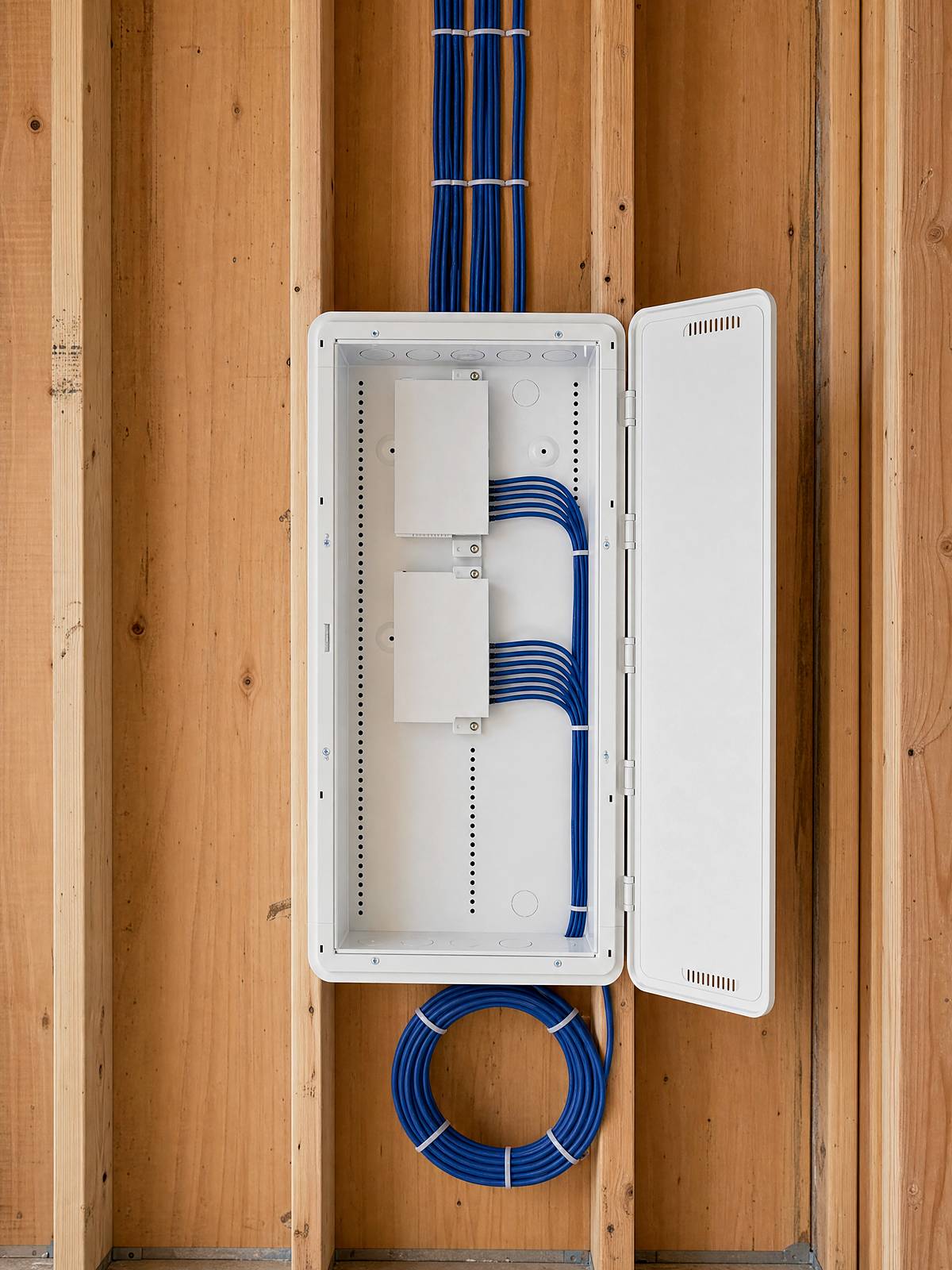
Pre-wiring means running every low-voltage cable your home will ever need while the walls are still open, and bringing it all back to one tidy, labelled panel. It starts with a proper system design, so nothing gets missed. Here is what typically goes in:
Wired vs. Wireless
Strong WiFi does not come from the router sitting in a closet. It comes from access points spread through the house, and every one of them runs back to a cable. The same is true for your cameras, your TVs, your game room, your office. Wireless is for the device in your hand. Everything that stays put runs faster and more reliably on a wire, and that is exactly what makes the wireless feel effortless everywhere you walk.
Future-Proofing
Electronics get replaced every five to ten years. The cabling behind your walls lasts twenty or thirty. So we wire for the standards that are coming, not just the ones you own today: spend a little more on better cable and a bit of conduit now, and every future upgrade becomes a quick swap instead of a renovation.
Timing
There is exactly one moment when wiring a home is cheap, clean, and completely invisible: while the walls are open. Before insulation and drywall, a cable run takes minutes and disappears into the structure. Afterward, the same run means fishing through finished walls, surface-mounted conduit, patched drywall, and fresh paint, or simply doing without. If you are building or renovating, this is the window, and it does not come around twice.
Common Problems
Why It Matters
Low-voltage cable is inexpensive, and running it through an open wall is fast. The cost of skipping it shows up later: in retrofits, in workarounds, in a house that fights you every time you want to add something. Wire it once, properly, and you stop thinking about it. The network just works. The speakers are already there. The cameras have a home. That is what a pre-wired house feels like: quiet, finished, and ready for whatever you plug into it over the next twenty years.
How We Work
Every pre-wire starts on paper. Before a single cable is pulled, we produce a full drawing set showing every run, device, and outlet, so the install is precise and nothing is forgotten or doubled up. It is the same discipline behind our system design and consultation work, and it is what keeps a pre-wire on budget.
FAQ
For most new builds and renovations, a complete low-voltage pre-wire — network, audio, camera, and TV locations, all brought back to one labelled panel — typically lands between $3,000 and $8,000, depending on the size of the home and how many runs go in. It’s a fraction of what the same wiring costs once the drywall is up. The free assessment gets you a fixed quote from your floor plan.
The short list: wired internet to every TV, office, and ceiling WiFi point; speaker wire where you’ll ever want music; camera and doorbell locations; and empty conduit to the places technology changes fastest. The honest answer for your home comes from a plan — that’s what the free assessment is for.
After framing and rough electrical, but before insulation and drywall. That is the window when cable runs are fast and invisible. We coordinate the timing with your builder so we are in at the right moment.
No. Any time walls are open, whether a renovation, an addition, or a gutted basement, is a chance to pre-wire. If the studs are exposed, we can wire it.
That is normal, and it is exactly why we run spare conduit, pull-strings, and extra drops back to a central panel. You wire for the home you might want, not just the one you have today, so adding something later does not mean opening a wall.
Yes. Low-voltage is its own trade, separate from electrical. We coordinate with your general contractor and electrician so the rough-in lands at the right time and nothing conflicts.
Strong, whole-home WiFi comes from wired access points, not the router alone. Hardwiring your access points, TVs, cameras, and office is what keeps the wireless fast and steady. Pre-wiring supports the wireless, it does not compete with it.
For most homes Cat6 is plenty. On the runs that matter most, to access points, offices, and media locations, we run shielded Cat6A or Cat7 for extra speed headroom and noise immunity. The bonus: with the right adapters, that same shielded cable can carry HDMI-class video, USB, or control signals alongside data and power, so one good run keeps its options open for years. We will tell you honestly where the upgrade is worth it and where it is not.
That is exactly what pre-wiring plans for. The equipment you buy today will be replaced in five to ten years; the cable and conduit in your walls will not. We run better cable than today's gear strictly needs, leave spare runs, and use conduit where it counts, so a future upgrade is a quick swap of the equipment rather than a renovation that opens your walls.
We design and install the wiring and the central panel, and we will recommend gear that fits your home, but we do not lock you into a proprietary system or sell you hardware you do not need.
Yes, that is the whole point of pre-wiring. Spare conduit and pull-strings mean a future speaker, camera, or data drop is a quick job instead of a renovation.
Send us your floor plans or tell us about the space. We will map every cable and give you a free assessment, with no pressure and no guesswork.
Free Assessment →Serving Toronto and the GTA — North York, Scarborough, Etobicoke, Vaughan, Markham, Richmond Hill, and Mississauga.